
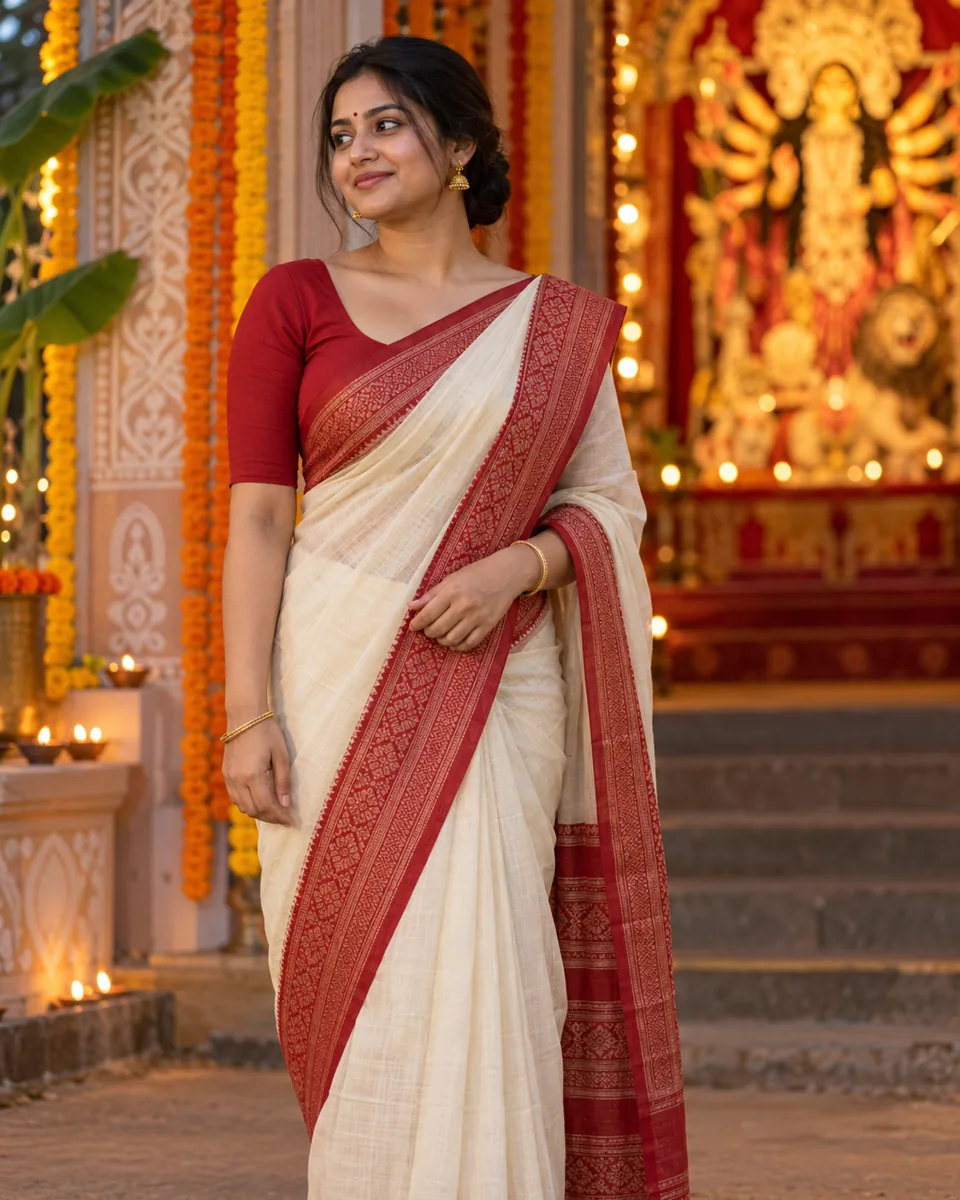
You get ready for an evening of pandal hopping, but the best corner is already crowded. One photo has a bright light behind your head. Another cuts off the saree border. If you want to recreate that quiet festive moment, this red and white saree Durga Puja photo prompt gives you a clear place to start.
The look is simple: an ivory cotton saree, a deep red border, small gold earrings and warm lights in the distance. The background sets the mood while the face and fabric stay easy to see. You can use the prompt to create an original portrait or try it with your own reference photo.
About the example: The featured image is an AI-generated portrait of an original adult model, created with ChatGPT image generation. It is not a photograph of a real Puja visit. Your result may differ, especially when you add a personal reference.
Copy the red and white saree Durga Puja photo prompt
Create a photorealistic vertical 4:5 Durga Puja portrait of an adult Indian woman in an ivory cotton saree with a broad deep red woven border and a modest red blouse. If I attach my reference photo, keep my facial features, age, skin tone and hairstyle recognisable; otherwise use an original adult model. Frame her from the head to below the knees, standing calmly beside a softly lit Puja pandal entrance in the early evening. She looks slightly away from the camera with a gentle smile. Use a low bun, small red bindi, simple gold jhumkas and two thin gold bangles. Her right hand loosely holds the saree edge near her waist; the left arm rests naturally. Keep fingers separate and both hands clear. Add soft warm light from the front-left, with blurred marigold garlands and small lights behind her. Keep the ivory fabric neutral, the red border distinct, cotton weave visible and pleats clean. Natural skin texture, realistic body proportions, no crowd, no text, no logo and no watermark.Frame: Vertical 4:5. Look: Three-quarter saree portrait. Example tool: ChatGPT image generation. The prompt can also be tried in an image editor that accepts a reference photo; exact face matching is not guaranteed.
Choose a reference that leaves room for the saree
Start with a clear photo of yourself in even light. A waist-up or standing photo is useful here because the final frame includes more than the face. Keep your shoulders visible, avoid a strong beauty filter and choose a picture where the eyes are sharp.
A close selfie can still guide the face, but the tool will have to invent more of the pose and body. If that happens, keep the first result simple. Check whether the shoulders, neck and waist look natural before asking for extra decorations. Upload only a photo you have permission to use.
Make the portrait step by step
Open your image tool and start a new chat. Attach your reference photo if you want a personal version, then paste the complete prompt. If the tool offers a shape setting, select a vertical frame close to 4:5. Do not upload the featured example as your identity reference; it shows the outfit and mood only.
For Gemini, Google explains the supported process in its official guide to generating and editing images. Available features can vary by account. The example on this page was made with ChatGPT, so it does not claim to show a Gemini test.
When the image appears, compare the face with your reference first. Look at the eyes, nose, jaw and skin tone. Then check the hands and saree. Save the result only after you are happy with those details. A beautiful background does not make up for a face that no longer looks like you.
Keep the ivory saree from turning yellow
Warm festival lights can push the whole picture towards orange. That makes the scene cosy, but it can also turn an ivory saree yellow and change the skin tone. The prompt asks for neutral ivory fabric so the warm colour stays mainly in the background.
If the first result is too yellow, ask for this small correction: keep the warm background lights, but make the saree ivory and restore natural skin colour. Leave the pose and face unchanged. Avoid asking for brighter colours everywhere, which can make the red border look neon.
For a different drape or fabric mood, browse our saree photo prompt ideas. Choose one direction before you generate again. Mixing several outfits into the same request can make the border and pleats harder to control.
Give the hands one easy job
This pose uses a light hold near the waist instead of a dance move or a complicated gesture. The hand should touch the edge of the saree gently. Watch for fingers that blend into the fabric, an extra thumb or bangles that cut through the wrist.
If a hand looks wrong, ask for that hand to rest naturally at the side. Keep the other details the same. You can also crop slightly closer, but leave enough of the saree border visible. The point of this look is the calm pose and contrast between the two fabric colours.
Let the pandal stay in the background
Marigold garlands and a few soft lights are enough to suggest the setting. A sharp crowd, a large sign or too many decorations can pull attention away from the portrait. Keep the entrance softly blurred and ask for clear space around the head.
The generated scene is a creative setting, not proof that you visited a particular pandal. If you share it, describe it as an AI portrait. You do not need to add religious objects or a specific ritual to make the outfit feel festive.
Check the crop before posting
A 4:5 portrait leaves space for the saree without becoming too tall. Keep a little room above the bun and below the hands. If you plan to use the image in a reel, ask for a separate 9:16 composition with more background space rather than stretching the finished picture.
Before you post, zoom in on the eyes, earrings, bindi and red border. Look for repeated jewellery, uneven pupils or a border that suddenly disappears. Correct one thing at a time. This makes it easier to keep the parts you already like.
Try another festive portrait
If you prefer a closer frame with less outfit detail, try the bottle green Navratri close-up prompt. For a wider standing pose with dandiya sticks, see the royal blue Garba photo guide.
Keep this red and white saree version for a softer evening portrait. Start with one clear reference, use the full prompt and take a moment to check the small details before sharing it.



1 thought on “Red and White Saree Durga Puja Photo Prompt for Girls”