
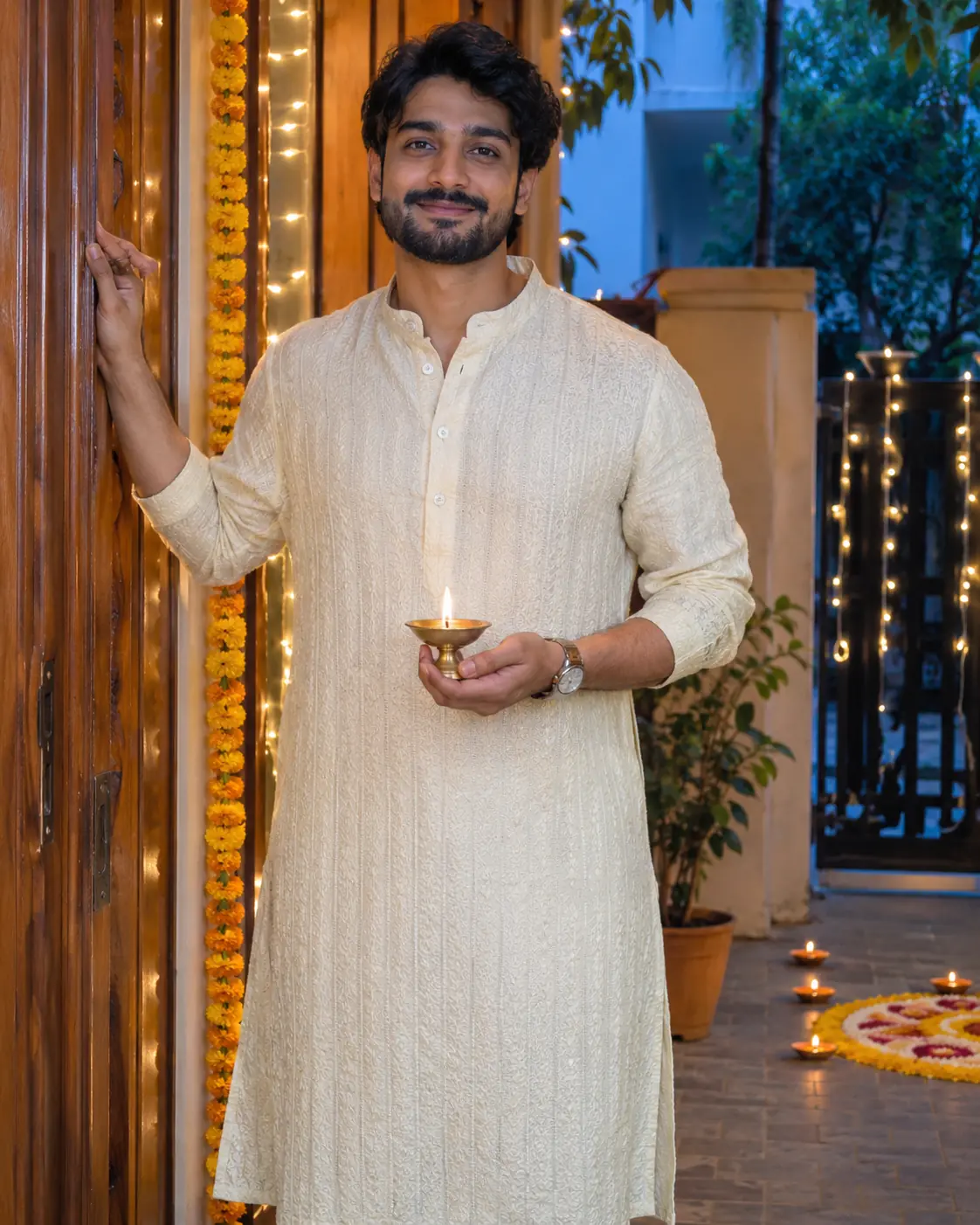
Diwali boy kurta lights AI photo prompt is the starting point for this simple guide. I keep the first scene clear so the result is easier to check.
Most of my Diwali photos with a kurta looked the same. I stood near the door, smiled once and the picture was done. The background lights were bright, but the photo had no feeling. A small action made the next portrait look more natural.
This Diwali boy kurta lights AI photo prompt gives the subject something to do. He can hold a diya, adjust his sleeve or look towards the doorway. That simple action helps the face and hands stay believable.
Copy the kurta and lights prompt
Create a high-end photorealistic vertical 4:5 Diwali portrait of one adult Indian man, age 22 to 30, standing near the entrance of his real Indian home after helping to light the festival lamps. He wears a well-fitted ivory cotton kurta with a subtle woven texture, a dark olive Nehru jacket and clean traditional footwear. Keep his face sharp, natural and masculine, with light beard texture, believable skin pores and a relaxed proud expression. Show him from head to below the knees, standing in a comfortable three-quarter pose. His right hand holds one small brass diya carefully at chest level and his left hand rests by his side with relaxed fingers. Add a modest rangoli, marigold flowers, two rows of diyas and warm balcony lights behind him. Use an eye-level 50mm lens, realistic Indian evening colour, soft key light on the face, gentle rim light from the diyas and physically correct shadows. Keep the kurta folds, jacket seams, lamp flame and home textures detailed but natural. Exactly one person, correct anatomy and five separate fingers. No extra limbs, floating hands, distorted clothing, giant flame, fake logos, written words, watermark, heavy HDR, plastic skin or blurry face.How to use it
Paste the prompt in ChatGPT or Gemini. If you are using your own photo, upload one clear adult reference and say keep the face recognisable. Add your preferred kurta colour after the first result. A 4:5 frame works for a post. Use 9:16 for a full story cover.
Keep the lights under control
Ask for a few visible diyas instead of hundreds of lamps. Too many lights can hide the face. If the kurta pattern becomes noisy, ask for a plain fabric with one thin border. If the pose feels stiff, replace standing straight with adjusting the sleeve or looking at a family member.
Fix small errors
For strange hands, ask for one diya and both hands visible. For a floating shoe, write both feet on the floor. If the background looks like a wedding stage, change it to a simple Indian home entrance. Make one edit at a time.
More festive prompts
For a night car look, see our black car night prompt. For a family photo, try our Diwali family AI photo prompt. Google’s Gemini image help lists the current controls.
Give the boy one clear action
A simple action makes a boys portrait easier to believe. He can light one diya, hold a small box of sweets or stand near the door after helping with the lights. I avoid asking for a big dance pose and a busy background in the same prompt.
For a stronger result, tell the tool where the camera is placed. A waist-up frame keeps the face and kurta detail clear. A full-body frame works when the shoes and floor are part of the story. If the kurta pattern changes, describe the main colour and collar again in a short correction.
Quick review
Look at the hands holding the diya and check that the flame is safe and small. Check that the home still looks Indian and not like a random studio. Add text after the image is ready so the kurta and lights stay sharp.
After the first render, zoom into the kurta collar, the lamp hand and the shoes. Small details decide whether the portrait feels like a real Diwali evening. Keep the original clean version and add any festival words later in your design app.
Why this simple kurta scene works
Last Diwali I wanted a clean portrait for a festive status, but my first idea had too many lights, props and poses. The face looked fine in the first result, yet the kurta pattern kept changing. I removed the extra details and kept one clear action: the boy stands near a doorway while he checks a small string of lights. That small action made the image feel like a real home moment.
Use the prompt near the top of this guide as the base. Paste it in ChatGPT or Gemini, then add one reference photo only if you need the face to stay close to a real person. A bright front-facing reference gives a better result than a dark group selfie.
Set the frame before you generate
Choose 4:5 for an Instagram feed or 9:16 for a story and WhatsApp status. Keep the camera at eye level with a medium-full crop. This leaves enough room for the kurta, hands and lights. Ask for a simple Indian home entrance, not a palace. A believable wall, wooden door and a small toran often look more natural than a huge decoration set.
Keep the main light soft. The fairy lights should be small points in the background. If every bulb becomes a bright star, the face loses detail. I usually ask for warm light on one side of the face and a gentle evening fill on the other side.
Small prompt changes for different moods
Calm family evening: Ask him to hold one diya plate at waist level and look slightly away from the camera.
Confident festive portrait: Keep both hands relaxed, one near the kurta pocket, with a straight natural posture.
Rooftop lights: Replace the doorway with a modest terrace wall and a distant soft skyline. Keep the subject large in the frame.
Do not change the clothes, location and camera in the same correction. One change at a time makes the output easier to compare.
Fixes when the kurta or face looks wrong
If the kurta turns into a sherwani, write “simple straight kurta, everyday festive cotton or silk blend, no heavy embroidery.” If the colour changes, repeat the exact colour once in the correction. Too many colour names in one prompt can confuse the tool.
If the hands look stiff, remove the prop for the first generation. Once the face and clothes are correct, add a small diya or phone in a second version. For a soft face, ask for natural Indian skin texture and clear eyes without plastic skin.
If the lights cover the head, move them behind the subject and ask for a clean space around the hair. If a second person appears, add “one adult Indian male only, no extra people or reflections.”
My quick quality check
I zoom in on the eyes, fingers and kurta border before saving. The face should have two eyes at the same level. The hands should have normal fingers. The fabric should meet the body without melting into the door. I also check that the light source makes sense. A diya should create a small warm glow, not paint the whole image orange.
Frequently asked questions
Can I use a different colour kurta? Yes. Replace the colour and keep the rest of the prompt unchanged for a fair comparison.
Why does my image look like a wedding poster? Remove words such as grand, royal and dramatic. Add everyday details like a home doorway, simple cotton fabric and a few lights.
Can I add text inside the image? It is safer to add the greeting later in Canva because generated letters may break.
For natural hands and faces, see our face and hands guide. For a warm family setting, try the Indian family portrait prompt.



1 thought on “Diwali Boy Kurta Lights AI Photo Prompt”