
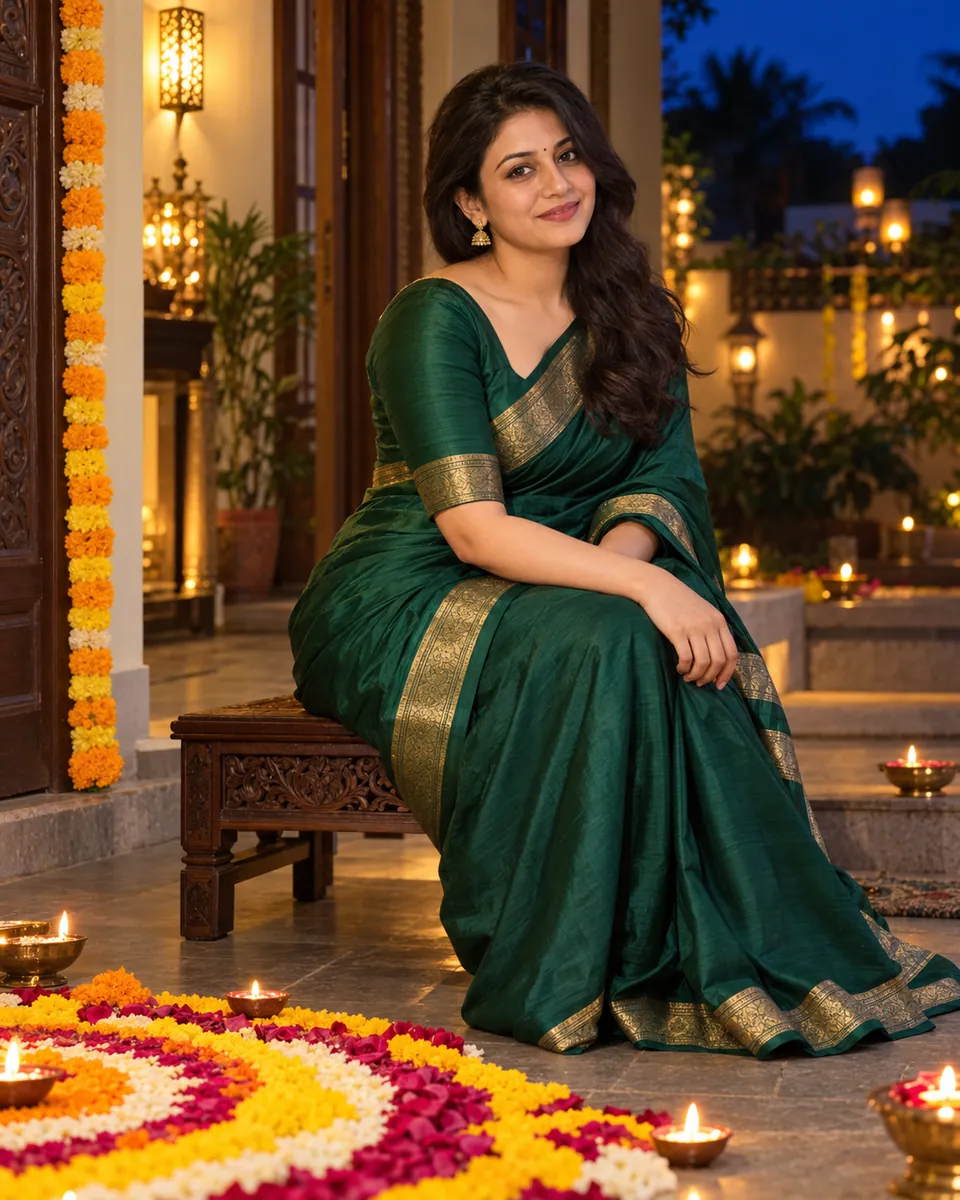
There is a lovely pause after the rangoli is finished and before everyone comes to the door. You sit down for a moment, the lights come on and your saree finally gets its own picture. This Diwali AI photo prompt for girls uses that familiar home setting, with emerald silk and warm doorway lamps.
Use this as a starting point for a personal festive edit, then adjust the details that matter to you. The featured example was made with ChatGPT image generation using original adult models. It is an AI-created scene, not a photograph from a real celebration. Reference-face matching can vary.
Copy the Diwali AI photo prompt for girls
Generate a realistic vertical 4:5 Diwali portrait of one adult Indian woman sitting comfortably sideways on a low carved wooden bench at a home entrance. If I upload a reference photo, retain her actual facial features, age, hairstyle and natural skin tone without reshaping or beautifying the face. Without a reference, create an original adult model. Style her in an emerald green silk saree with a restrained gold border, a matching blouse, small gold earrings and natural makeup. Her shoulders turn gently towards the camera, with a soft relaxed expression. Rest both hands separately on her lap, showing natural wrists and fingers. Place a flower-petal rangoli on the floor in the foreground, a few small diyas away from the saree and a marigold garland around the doorway. Use soft warm wall lighting at blue hour, with realistic skin texture, rich green fabric folds and small controlled gold highlights. Knees-up composition, entire head visible, uncluttered background. No held props, extra fingers, floating petals, text, logo or watermark.Image ratio: 4:5 vertical. Example tool: ChatGPT image generation. Use consenting adult references for personal edits.
Let the seated pose stay easy
Sit slightly sideways on the bench and turn the shoulders gently towards the camera. This gives the saree folds room to fall naturally. A small smile works well; the expression should feel like someone has just called your name, rather than a fashion pose held for too long.
Keep both hands resting separately on the lap. They do not need to hold a diya or arrange flowers. If the hands overlap and become confusing, ask for one hand on each knee, with relaxed fingers and natural wrists.
Choose the face reference carefully
A clear photo in even light gives you a useful starting point. Avoid screenshots with a small face, strong filters or a hand covering the cheek. A slight angle can help with this turned seated pose, but a front-facing image can still guide the identity.
Check the face before judging the decorations. Look at the eyes, nose and jaw against the original. Ask to preserve the actual age and skin texture if the editor makes the face look younger or overly smooth. Do not accept a different face simply because the outfit looks good.
Keep emerald silk rich rather than shiny
Emerald green can look beautiful beside warm lamps, but strong highlights may turn silk into a metallic surface. Ask for broad soft folds and controlled shine. The shaded parts should remain green instead of becoming flat black.
The gold border should follow the fabric, including where it bends over the lap. If it becomes a rigid strip or crosses through a hand, request a simpler drape. Small earrings leave more room around the face than heavy layered jewellery.
Give the rangoli its own space
The flower rangoli belongs on the floor, with enough visible space to read as a design. Keep it separate from the saree hem and bench legs. Blurred petals are fine in a close portrait, but they should not float up around the hands.
Diyas should sit on a solid surface away from clothing. They are background details here, not a reason to light the entire face from below. Soft wall lights make the portrait easier to read while the small lamps add warmth.
Make the first edit simple
Upload your reference if the editor supports it, paste the complete prompt and choose 4:5 vertical when available. Generate one result, then inspect the face, hands, saree border and bench. Correct the largest visible problem first.
For example, ask to keep the face and lighting unchanged while separating the hands on the lap. If the background is crowded, remove extra decorations before changing the pose. Specific edits are easier to assess than asking for a completely better image.
Compare another saree mood
For a different festive colour pairing, see our red and white saree portrait guide. If you want more outfit colours, the Navratri photo prompt collection offers several separate looks.
Save a crop with space above the head and no cut through the hands. View it on a phone as well as zoomed in. Describe the result as an AI edit when sharing it, and keep the version that still feels like you.
Using this prompt in your image editor
The example on this page was generated with ChatGPT. If you prefer Gemini, Google’s official image generation and editing guide explains the supported upload process. Available features depend on the account; the same prompt may produce different results in different tools.
Save the version with clear faces and believable details rather than the one with the most decoration. A natural expression, clean fabric and a simple background usually make a stronger small-screen portrait than several competing effects.



1 thought on “Diwali AI Photo Prompt for Girls: Emerald Saree and Rangoli Portrait”