
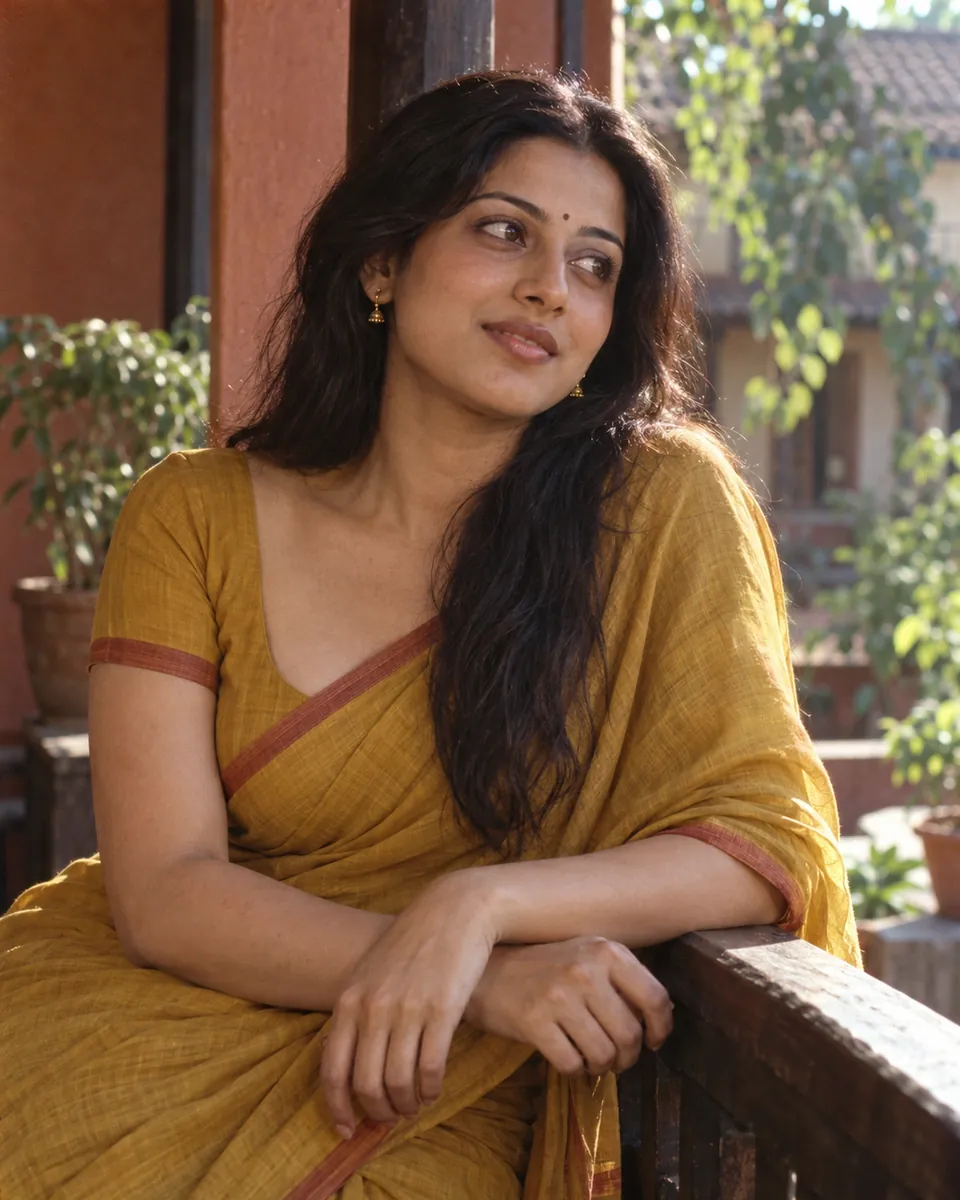
A quiet veranda, a cotton saree and the last afternoon light can tell a story without a dramatic backdrop. This 1970s Bollywood AI photo prompt creates a film-inspired portrait with mustard and rust colours, soft shadows and a thoughtful expression. It borrows an era’s visual mood rather than copying an actor’s face.
Example note: The featured example was generated with ChatGPT using an original adult model. It is a modern AI-created image, not an archival photograph. The reference instructions below are for personal edits; exact face matching is not guaranteed.
Copy the prompt
Use my uploaded adult portrait as the identity reference and create a photorealistic 1970s-inspired Indian film portrait. Preserve my actual age, individual facial features, hairstyle, skin tone and natural proportions; do not turn me into a celebrity or reshape my face. Without a reference, create an original adult Indian woman. Dress her in a mustard cotton saree with a narrow rust border, a simple matching blouse and small gold earrings. Place her on an ordinary veranda with a wooden railing, terracotta wall and a softly blurred leafy courtyard. Her body turns slightly away while she looks thoughtfully just beside the camera, with a relaxed half smile. One hand rests naturally on the railing, with correct fingers and a relaxed wrist. Frame from the chest or waist up, keeping the whole head inside the image. Use soft late-afternoon side light, muted warm colours, restrained contrast and subtle 35mm film grain. Keep visible skin texture and believable cotton folds. Vertical 4:5. No sepia wash, artificial scratches, plastic skin, text, logo, watermark or celebrity likeness.Tool used: ChatGPT image generation. Format: 4:5 example. Use the original upload for editing; results vary by source and tool.
Choose film mood instead of a face filter
The look comes from the setting, light, cloth and restrained colour. It does not require an exaggerated hairstyle or a face that resembles a film star. Keep the reference person recognisable and let the scene carry the period feeling.
A simple wall and courtyard are enough. Adding a palace, vintage car and stage lights at the same time changes the story into a costume shoot. Begin with the veranda and add only details you actually want.
Pick a reference with an open face
Use a clear portrait with visible eyes and no strong beauty filter. A slight turn can suit the final pose, but the editor still needs enough detail around the nose and jaw. Avoid a tiny cropped face taken from a group photo.
After generation, compare the eyebrows, nose, jaw and hairline with the reference. If the face has become generic, ask to preserve those features while keeping the saree and veranda unchanged. Do not keep regenerating the entire scene without checking identity.
Keep mustard fabric from becoming gold
Cotton should show soft folds and a mostly matte surface. A narrow rust border helps separate the drape without making the outfit busy. If it looks like metallic bridal silk, request plain woven cotton and remove sequins or heavy embroidery.
Small earrings keep the face clear. Ask for a natural neckline and a simple blouse rather than letting the tool invent layers of jewellery. Check that the border bends with the fabric and does not pass through the hand.
Use grain lightly
Film grain should be a fine texture, not a layer of dust hiding the eyes. Keep the face sharp enough to recognise. Heavy scratches and a brown wash can make every image look old, but they do not automatically create a convincing film frame.
If the result is too orange, request muted warm colours with natural skin and green leaves still visible in the background. The shadows can stay soft and a little deep; they should not erase one side of the face.
Check the railing and the resting hand
The wrist should sit comfortably above the rail, with fingers resting rather than gripping tightly. Follow the arm from shoulder to hand. Repair a bent finger or a rail passing through the palm before changing the background.
Straight railing lines also help you spot warped geometry. If the veranda looks stretched, ask for an eye-level camera and realistic perspective. Keep the crop simple with a little space above the head.
Try one result before making variations
Upload the reference in an editor that accepts photos, paste the complete prompt and select 4:5 if the tool offers it. First check identity and anatomy, then outfit, light and texture. Make the next request about one visible problem.
For more saree compositions, browse our saree photo prompt guide. For a brighter festive setting, try the emerald saree Diwali portrait. Save the version that looks natural at phone size and label it as an AI edit when sharing.
Before you generate
Choose an editor that supports the kind of reference you need. Google’s official image generation and editing guide explains the Gemini upload workflow. This page’s example was made with ChatGPT, so it is not a claim of an identical result across tools.



1 thought on “1970s Bollywood AI Photo Prompt: Mustard Saree Film Portrait”