
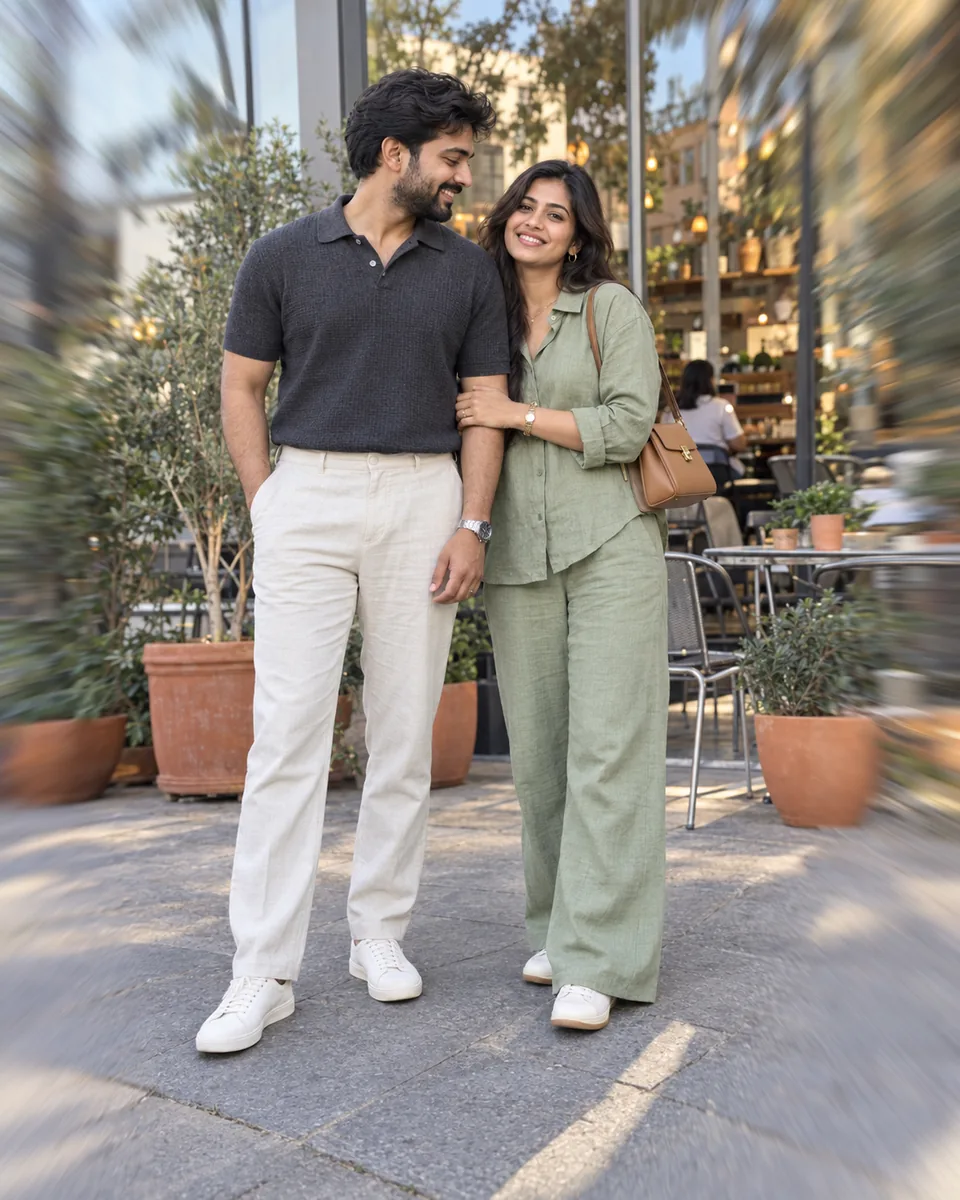
You stop outside a cafe after a date, take one quick photo, and the entrance almost looks better than the pose. This cafe couple zoom blur AI photo prompt keeps that everyday setting but adds movement around the frame. The couple stay clear while the outer edges seem to rush past.
The example uses fictional adult models and was made with ChatGPT image generation. It demonstrates the scene and composition rather than a real person’s face transformation.
Copy the prompt
Create a realistic vertical 4:5 full-body photograph of an adult Indian romantic couple outside a neighbourhood glass-fronted cafe. Use the attached adult references when supplied, keeping each person’s face, age, hair and skin tone distinct; otherwise use two original adult models. The man wears a charcoal knitted polo tucked into relaxed ivory trousers. The woman wears a sage-green linen shirt and matching wide-leg trousers, with a small tan handbag. She holds his elbow and smiles towards the camera while he smiles at her. Keep complete heads and shoes visible, with relaxed posture and separate natural fingers. Include terracotta plant pots, metal cafe chairs and believable reflections in the glass. Use late-afternoon neutral daylight and a natural 35mm-equivalent perspective. Keep the couple sharp in the central 60 percent of the image. Apply moderate radial zoom streaks only near the outer edges, centred between their upper bodies. Do not blur faces, fingers or clothing outlines. Preserve natural brown skin texture and realistic fabric folds. No copied signage, random text, watermark, plastic skin or extra people in the foreground.Tool used for the example: ChatGPT image generation. Ratio: 4:5 portrait.
What the zoom effect should do
Think of the blur as a frame around the couple. It should lead your eyes inward, not make the whole picture look out of focus. Pots and chair legs near the corners can stretch slightly, but the two faces should remain easy to recognise.
This is different from ordinary background blur. Soft bokeh hides detail; a zoom effect creates lines that seem to travel towards or away from the centre. Asking for both at maximum strength often loses the cafe setting.
Set up your references
Upload a clear couple photo or two separate adult portraits you have permission to use. Label separate photos before pasting the prompt. A standing reference helps if you want the outfit and body proportions to stay close to the source.
Choose a portrait canvas if available. Make the clean couple portrait first if the tool struggles with the effect, then ask it to change only the outer edges. Reference instructions can guide likeness, but they do not guarantee an exact identity match.
When the faces or building start stretching
Ask: “Restore both faces and bodies to sharp, undistorted proportions. Keep the radial streaks outside the central subject area.” Correct this before making colours or light more dramatic.
If glass frames bend like a fisheye photo, reduce the blur strength. Keep the camera at chest-to-eye height and avoid a very wide lens description. Check fingers around the elbow and make sure the handbag strap does not merge with an arm.
Try one change
For a softer weekend look, change the charcoal polo to an oatmeal T-shirt while keeping everything else. For an evening version, ask for gentle light on the faces and warm cafe windows rather than stronger blur.
Using Gemini instead? Google’s official image creation and editing guide explains its image workflow. This exact example was not tested in every generator, so results and controls may differ.
More photo ideas
For three quieter moments from one date, try our romantic cafe collage prompt. For open-air light, see the rooftop couple portrait.
Explore the couple AI photo prompts collection for more complete prompts and examples.



1 thought on “Cafe Couple Zoom Blur AI Photo Prompt: Sharp Faces, Moving Edges”