

I already had a rain couple prompt that was giving good results. One day I just added an umbrella to the same prompt and the output was completely different. The whole scene felt more intimate, more filmy. That one small change made a big difference.
If you want that classic Bollywood rain shot where the couple is sharing an umbrella with wet cobblestones and warm light in the background, this prompt is ready for you.
Why Umbrella Changes the Whole Scene
Most rain couple prompts give you two people standing in rain. It looks good but it feels incomplete. When you add an umbrella the composition becomes tighter. Both faces come closer. The light falls differently. The whole mood shifts from dramatic to romantic.
I tested this on Gemini 2.5 Pro and the umbrella detail alone made the background feel more cinematic. The shallow depth of field worked better because the umbrella gave the scene a natural frame.
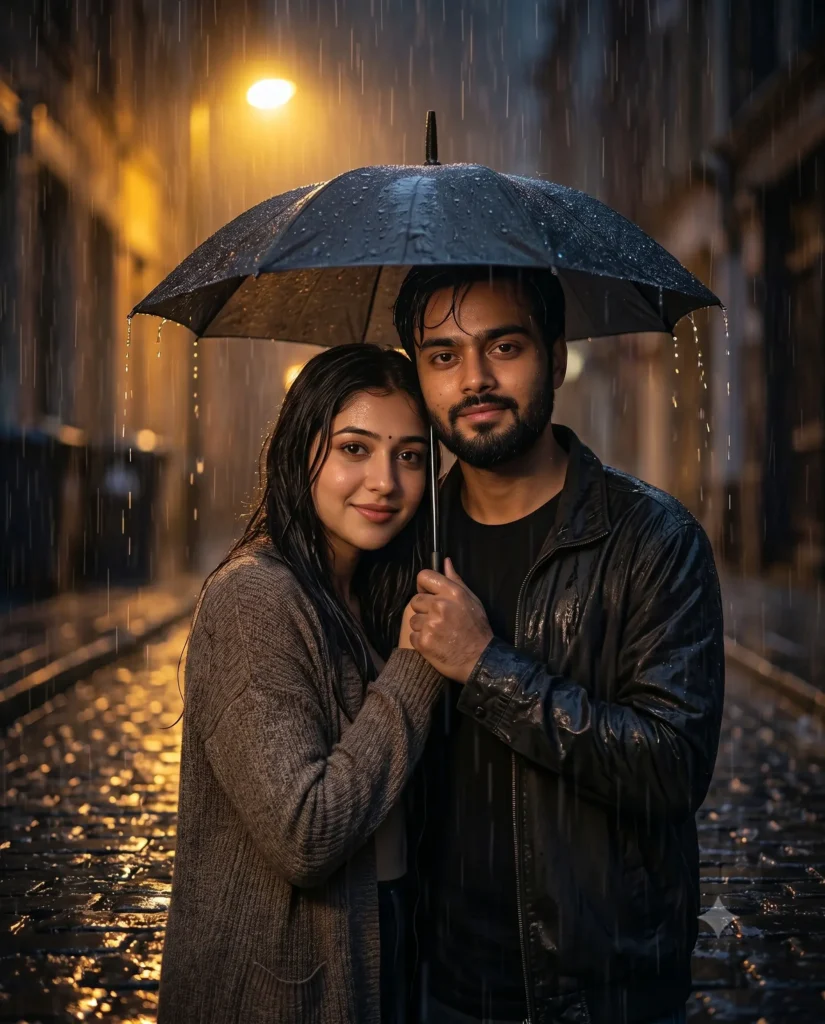
The Prompt:
Ultra realistic cinematic romantic couple portrait sharing one umbrella in heavy rain, IMAGE RATIO 9:16, use the uploaded photo as identity reference for both individuals, preserve exact facial features and bone structure, no artificial face replacement, natural Indian wheatish and brown skin tones with visible pores and realistic skin texture, no cartoon, no animation, no 3D, no illustration style, couple standing close together under a small black umbrella on wet cobblestone road, woman leaning slightly on man's shoulder, both looking ahead with soft romantic expressions, wet hair and natural drenched look, warm yellow streetlight from behind creating backlit rain glow, puddle reflections on cobblestone road, DSLR camera 85mm lens, f/1.8, shallow depth of field, background softly blurred, photorealistic, high resolution.How to Use This Prompt
Open Gemini 2.5 Pro and upload a clear front facing photo of both people first. Then paste this prompt and generate. Rain scenes usually need two or three regenerations before you get the best result so do not stop at the first output.
A few things that help get better results:
- Use a well lit natural photo as reference, avoid dark or filtered selfies
- If faces look off in first result just regenerate once or twice
- Make sure both faces are clearly visible in the reference photo
What I Changed to Get an Even Better Version
After getting a good result with this prompt I tried one small change. I replaced cobblestone road with railway platform and the whole vibe shifted. It felt more nostalgic, more like an old Bollywood scene. I wrote a separate prompt for that which you can check here — Couple on Railway Platform in Rain AI Photo Prompt.
Which Platform Works Best
I tested this on Gemini 2.5 Pro, Midjourney and Kling. Gemini gave the most realistic rain texture and the umbrella detail came out the best here. Midjourney was cinematic but faces drifted slightly from the reference. Kling was decent but lighting felt flat.
Stick with Gemini 2.5 Pro for this one. If you try this and get a good result drop it in the comments. Every reference photo gives a different output and it is always interesting to see.



1 thought on “Couple Sharing Umbrella in Rain AI Photo Prompt for Gemini”